Isolated Sandbox Testing
Shopify Staging Environments & Sandbox Workspaces
A Shopify staging environment is an isolated sandbox that mirrors your live store so you can safely test theme code, bulk price updates, and app integrations before pushing them to real buyers. Woonic delivers automated staging sandboxes without requiring enterprise Shopify Plus fees.
Included on Woonic Professional (3 sandboxes) & Plus (unlimited)
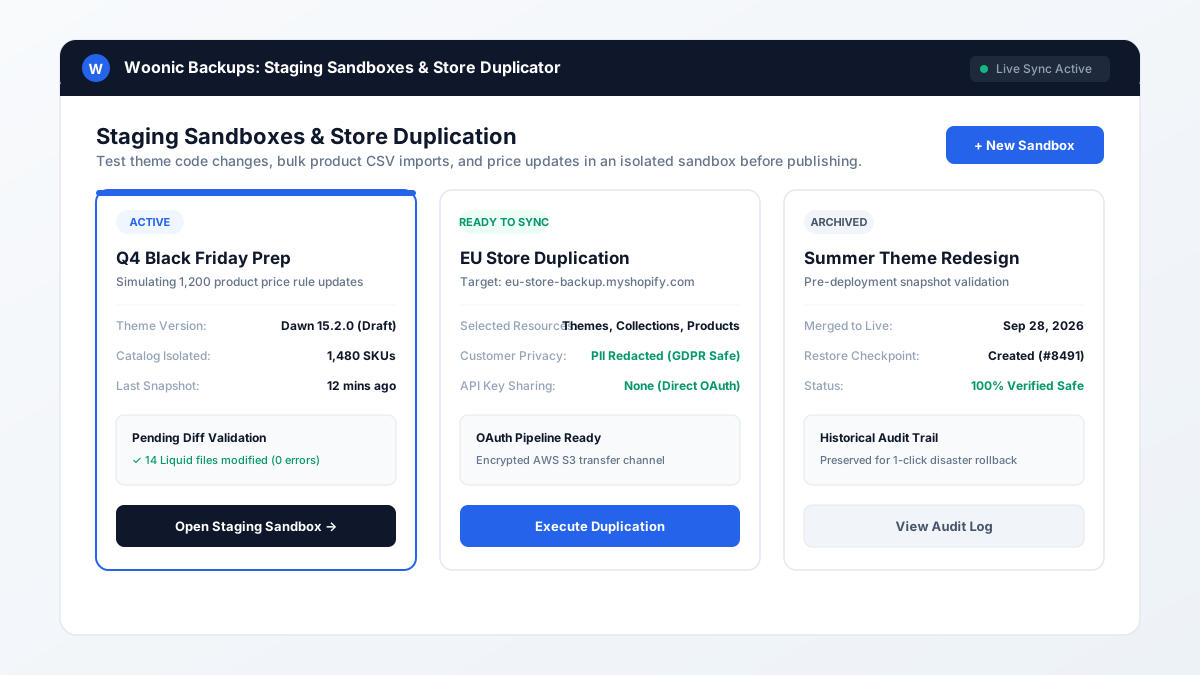
Figure 4.1: Woonic Staging Center displaying active sandbox workspaces, catalog isolation, and change validation logs.
Why is testing directly on a live Shopify store dangerous?
Direct Answer:
Testing bulk catalog modifications, Liquid theme edits, or complex discount scripts directly on a live Shopify store risks immediate revenue loss. A single misaligned CSV column can set product prices to $0 or erase inventory counts across all fulfillment locations during peak shopping traffic.
In traditional software engineering, deploying untested code directly to production is considered unacceptable. Yet in e-commerce, thousands of Shopify merchants routinely run bulk edits live on production because setting up dedicated staging stores historically required complex manual CSV exports and expensive multi-store partner subscriptions.
Comparison: Shopify Plus Staging vs Partner Dev Stores vs Woonic
| Feature | Shopify Plus Sandbox | Manual Partner Dev Store | Woonic Staging Center |
|---|---|---|---|
| Required Plan | Shopify Plus ($2,000+/mo) | Partner Account required | Any Shopify Plan (starts $39/mo) |
| Catalog Synchronization | Manual import via CSV | Manual API scripts / CSV | 1-Click automated sync from snapshot |
| API Key Exposure | Admin tokens required | Private app keys shared | Zero-trust direct OAuth transfer |
| Pre-Deploy Diff Audit | No built-in diff viewer | Requires manual Git setup | Built-in visual diff validation |
| Rollback Safety Net | Manual re-import | Manual rebuild | 1-Click disaster recovery restore point |
How to use a Woonic staging sandbox in 4 steps
- Create a Staging Workspace: Open Woonic inside your Shopify admin, navigate to Staging Center, and click "+ New Sandbox".
- Select Assets to Mirror: Choose your product catalog, theme layout, collections, and custom metafields to populate into the isolated workspace.
- Execute and Audit Changes: Perform your bulk price updates, theme redesigns, or CSV imports inside the sandbox environment.
- Inspect Diffs & Push Live: Review Woonic's change validation diff logs. Once verified error-free, deploy the changes to your production store.
Staging FAQ
Staging Environment Frequently Asked Questions
A Shopify staging environment is an isolated clone or sandbox workspace of your online store where developers and merchants can safely test theme code modifications, bulk product CSV updates, and app configurations without affecting live customer transactions or store revenue.
No, standard Shopify plans (Basic, Shopify, and Advanced) do not offer built-in staging environments or sandbox stores. While Shopify Plus merchants can request sandbox development stores, standard stores must either manually set up a separate partner store or use an automated staging tool like Woonic Staging Center.
Yes. Woonic allows you to clone your product catalog into a sandbox workspace, perform your bulk CSV spreadsheet upload or price overhaul, inspect the diffs to ensure no columns shifted, and then push validated changes to your live store with confidence.
No. Woonic staging environments are completely decoupled from your production checkout and live customer order pipeline, ensuring that testing has zero impact on active buyers.
Stop testing on live production
Deploy with confidence. Launch staging sandboxes and test bulk changes safely with Woonic.
Start Free Trial on Shopify App Store →